
A three-part series
Analytics is what we do for a living, so when we rebuilt this site we wanted to practise what we preach. We also wanted to compare the big tools side by side, on the same data: Google Analytics 4, Mixpanel, PostHog, Amplitude and Statsig.
The obvious way to do that is to paste five tracking snippets into the page. We didn't. Not one of those vendors' scripts runs in your browser on this site, and yet all five tools receive every page view and click. This article explains how, and what that choice costs.
Key takeaways
- We set one hard rule before choosing anything: visitors' experience beats data quality.
- A tiny script of our own sends events to our own server, which forwards them to every tool after replying to the browser.
- The price is real: no autocapture, no session replay, no heatmaps. For some tools that's most of the point.
- Every tool gets identical events and ids, which makes comparing them fair.
The one rule we started with
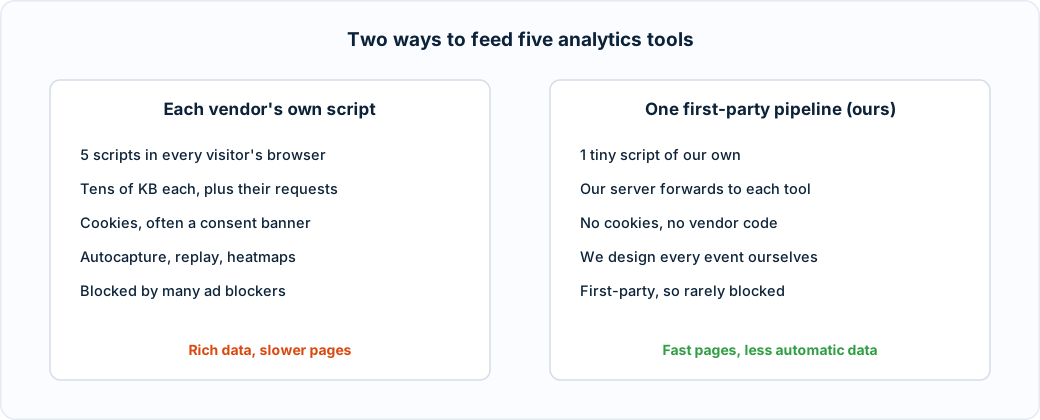
Before choosing a single tool, we wrote down the rule everything else would follow: minimal impact on site speed and visitor experience. If we have to choose, we give up data quality, not speed.
That sounds obvious until you look at a typical tracking setup. Each vendor's browser script is often tens of kilobytes, makes its own network requests, usually sets cookies, and frequently brings a consent banner along with it. One is tolerable. Five, on every page, is a slow site.
The tools we chose, and the ones we didn't
We kept five, because between them they cover how most of our clients work:
- Google Analytics 4, because almost everyone has it.
- Mixpanel and Amplitude, for product-style analysis: funnels, cohorts and percentiles.
- PostHog, an open-source alternative with good web analytics views.
- Statsig, mainly an experimentation platform, with analytics alongside. We use it for events only for now. If we ever run an A/B test, we'll decide which version a visitor sees on the server, not with its browser SDK, so pages don't flicker.
Just as useful is the list of tools we looked at and turned down, because the reason is the same each time.
- Heap is built around autocapture: its script records every click and form interaction so you can define events later. Heap does have a server-side API, but sending it our events would only duplicate what the other four already get, minus the feature that makes Heap different.
- Pendo also has a server-side events API. But its guides, visual tagger, session replay and in-app surveys all need its browser script, and those are why people choose Pendo.
- Vercel Speed Insights would have measured page speed for us, but it's billed per data point. We didn't want surprise bills, and in part 3 we built the same measurement ourselves.
The question we asked every tool
"What can you do from the server, and what do we lose without your script?" For autocapture-first tools, the honest answer is "most of the point". That's fine: it tells you the tool isn't the right fit for a speed-first site, before you've integrated anything.
How it works: a first-party pipeline
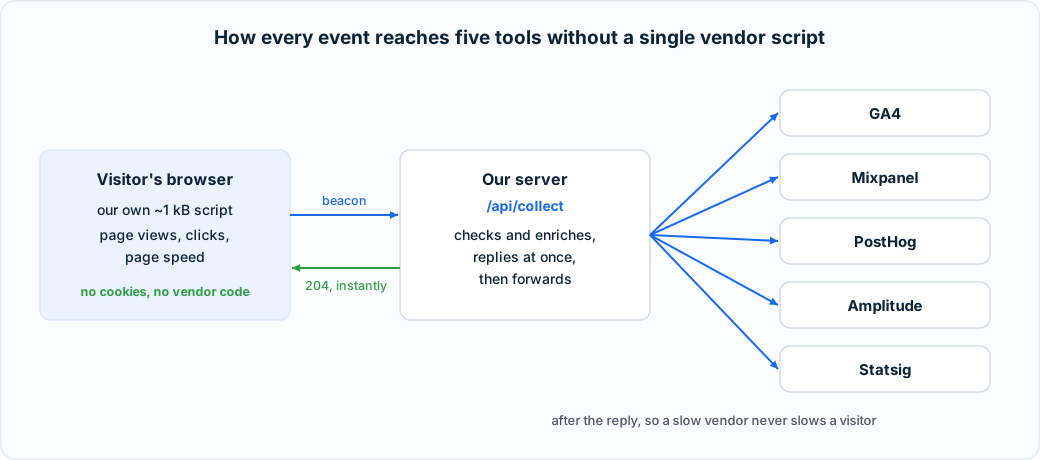
Here's the whole design in one picture.
1
A tiny script of our own captures what happens
About a kilobyte of our own code records page views and clicks. It uses the browser's sendBeacon feature, which never blocks the page and still delivers if the visitor is leaving.
2
It sends everything to our own server, not to a vendor
Events go to an address on our own domain. Because it isn't a third party, it's rarely caught by ad and tracker blockers, and visitors' browsers never talk to five different companies.
3
Our server replies immediately
It checks the event is well formed, adds the browser and device type, and answers straight away. The visitor's browser is done.
4
Only then does it forward to every tool
After replying, the server sends the event on to each tool's own server-side API. A slow vendor can never slow a visitor down.
Each tool gets its own small adapter on the server that translates our event into that tool's format. Adding, removing or swapping a tool means changing one file. The site's own code never changes, because it never talks to a vendor in the first place.
Identity without cookies
To count visitors and sessions you need some way to recognise them. We don't use cookies, and we never collect names, emails or anything typed into a form.
- A random visitor id, generated in the browser and kept in its local storage.
- A session id that starts fresh after 30 minutes without activity. We use a type of id that embeds its own start time, which turned out to be exactly what some of the tools want.
- Campaign tags (the
utm_parameters on a link) are remembered for the rest of the session, so a click three pages later is still credited to the campaign that brought the visitor in.
Every tool receives the same ids, each in the format it prefers. GA4 wants the session start in seconds, Amplitude in milliseconds, PostHog and Mixpanel the id itself, and Statsig calls the visitor a "Stable ID". When the tools disagree about a number, it's because of how they process data, not because they saw different data.
And if your browser sends the Global Privacy Control signal, asking sites not to track you, nothing is sent at all.
What we gave up
This isn't free, and pretending otherwise would be bad advice.
- No autocapture. We decide in advance what to track. If we want a new event, we have to add it, and we can't go back and find it in past data.
- No session replay and no heatmaps. Watching recordings of real visits is genuinely useful for finding confusing pages. Every tool that does it needs its own script, recording in the browser.
- GA4 is thinner. Some of its built-in device and location reports expect its own browser tag. We send the same information as custom parameters instead, which takes some setup on the GA4 side.
For a small, content-led site where speed matters, that trade is easy. For a large store trying to fix a confusing checkout, replay on a sample of visits might be worth its weight. The point is to make that choice deliberately, rather than by pasting in whatever the vendor's setup guide says.
Does it actually cost visitors nothing?
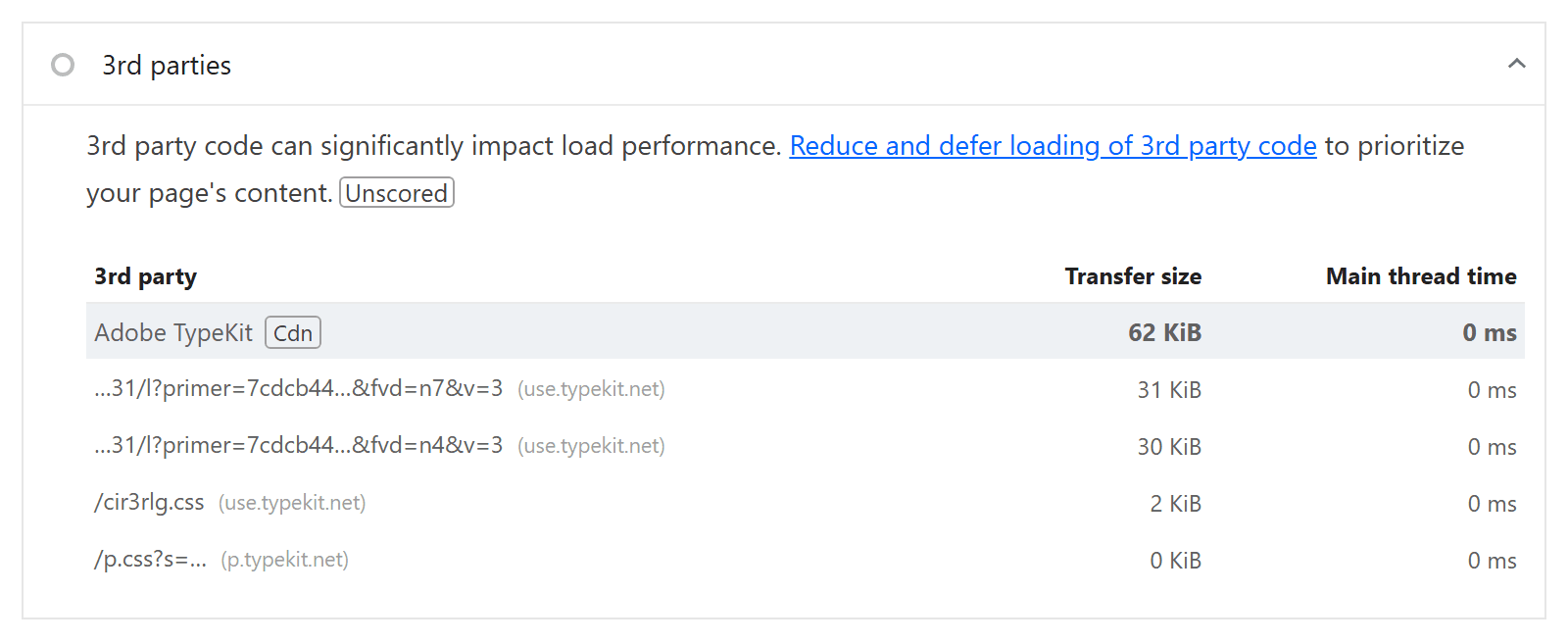
We checked. Lighthouse, the tool behind Google's PageSpeed Insights, lists every third-party resource a page loads. On our live homepage there is exactly one: the font service for our typeface. No analytics vendor appears at all.
In part 2, we get into the details: designing the events, capturing clicks without autocapture, and the tool that said "200 OK" and quietly threw our data away.